Context and goal
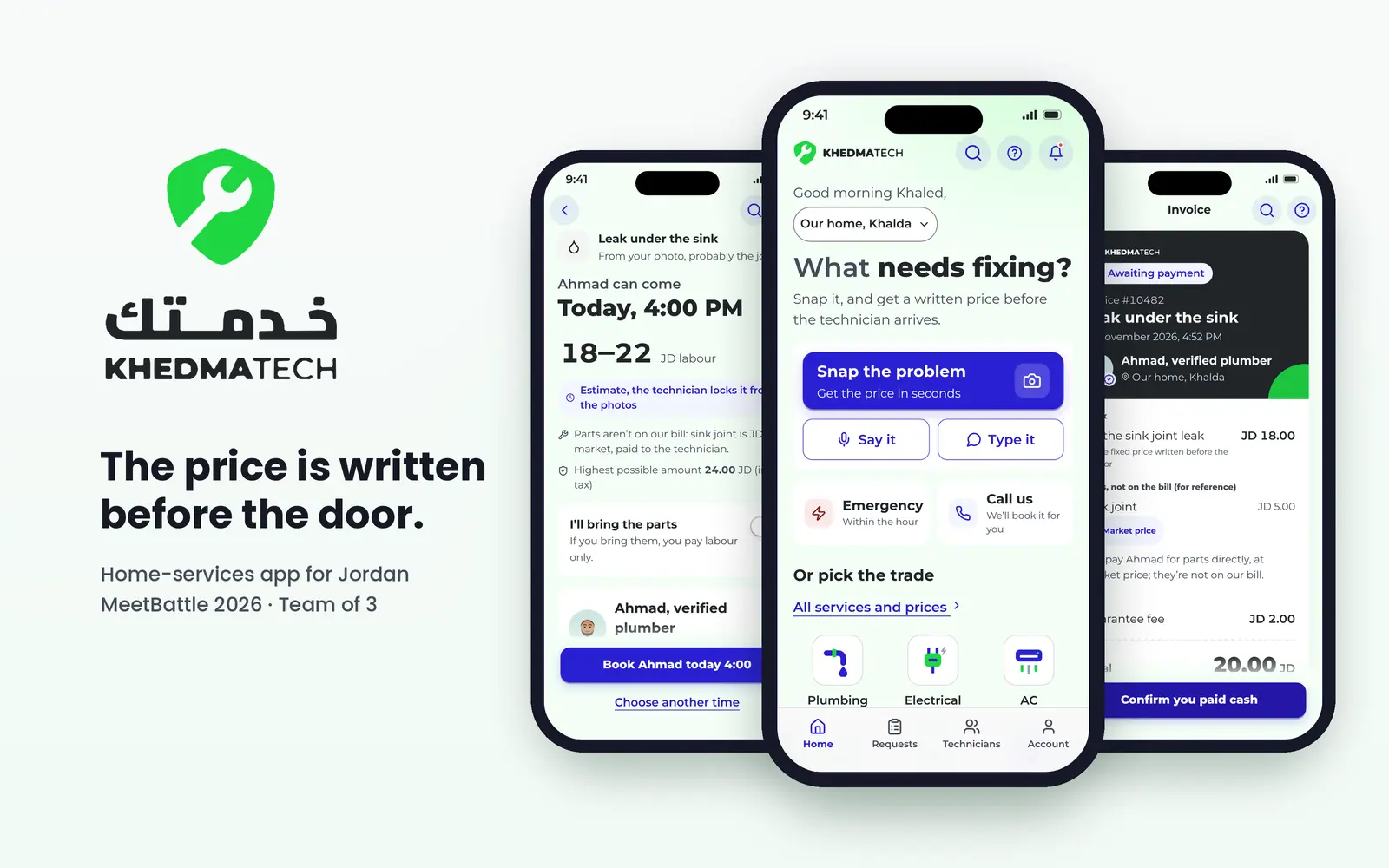
Khedmetak («خدمتك», “at your service”; KhedmaTech in the English build) was built by a team of 3 for the MeetBattle 2026 competition: two weeks, four checkpoints and three tracks (UX/UI, brand and business). I worked as a product and UI/UX designer. It connects families in Jordan with verified technicians: the price in writing before the door, a technician on time, and a 30-day guarantee.
For the competition the service area is Amman, Irbid and Zarqa only. People in other cities see a clear “We’re not in this city yet” screen instead of a booking flow that cannot be fulfilled.
Credit: the Khedmetak brand (name, logo and visual identity) was made by the team’s brand track. It is not my work. My part was product and UI/UX design.
Research
A survey (42 responses, 16 qualified households), interviews with 9 customers and 1 technician, and a review of similar apps.
- reach a technician through people they know
- 13 of 16
- had a technician arrive late or not at all
- 9 of 16
- paid more than expected or had no price
- 10 of 16
- had no guarantee on the work
- 14 of 16
11 of 16 go back to the same technician. Trust is personal, so the app has to earn it the same way: a named, checked technician and a price agreed before the door.
Competitors
We mapped Jordanian, regional and global home-service apps in seven groups, from direct competitors such as Faz3a, Mahlooleh, Home2Serv, WeFix JO and HomFix to apps that closed (Homejoy, Washio). For each we drew its flow and site map, read its terms, and sampled about 120 App Store reviews to see where people really got upset.
Stage: Insights
What people told us
- Afraid of being cheated: P1 paid 15 JD for a part worth about 10.
- Helpless while waiting: P7 took a day off and waited until night.
- Worried about letting a stranger in: P6 and P9 ask neighbours and relatives about the technician first.
- Alone when the work goes wrong: P2’s tiling turned out poor, with no invoice.
- Comfortable with “their” technician: P1, P5, P6 and P9 called one they already know.
P8, after a verbal deal went wrong, asked for the price in writing “so it becomes a contract”. That is where “one agreement before the door” came from: the price before the work starts, and someone who answers after it.
Our persona Abu Khalil comes from P2: small text and many steps confuse him. Our rule became: if Abu Khalil can book alone, everyone can.
Stage: Problem statement
The problem
- Finding: through relatives, WhatsApp, Facebook groups and OpenSooq. Nothing is verified.
- Price: known only after the technician arrives; parts are often overcharged.
- After the job: no guarantee if the problem comes back.
An adaptive challenge, not a technical one: building a booking app is the easy part. The hard part is trust and habit. Customers must trust a technician from an app over a cousin’s recommendation, and technicians must accept up-front prices and ratings.
From each problem to a feature
Late or no-show: 9 of 16
A confirmed time, live tracking, an early alert, and 1 JD credit if the technician is late.
Paid more or no price: 10 of 16
A written agreement before the door: photo, voice or call; AI reads the photo and the technician locks the price.
No guarantee: 14 of 16
An invoice and a 30-day guarantee on every job, with a dispute flow if something goes wrong.
Rebook their own technician: 11 of 16
“Book the same technician” and “Invite yours”, so trust built offline moves into the app.
Booking took 8.4 steps on average; the goal was 8 steps or fewer. Technicians get a clear job before they travel, and pay 0% commission on their own customers for the first 90 days.
Stage: Ideation
Key decisions
Parts stay off the bill
The app shows the market price of each part so overcharging is visible, but parts are paid to the technician directly. The bill is labour plus a 2 JD guarantee fee, with the highest possible amount shown before booking.
The price is locked before the door
The customer sends a photo, voice note or call; the technician sees it and locks the labour price before he travels. Any extra work needs the customer’s approval in the app.
One payer
There is no “a family member pays” option: one account books and pays, so the price agreement and the guarantee stay with one person.
Business model
- Revenue: about 2.48 JD profit per booking on a 20 JD invoice.
- Break-even: 1,452 bookings a month cover the team.
- Technicians: 0% commission on their own customers for the first 90 days, then 5%.
- Technicians are vetted in a 6-step sign-up that includes a practical test.
Stage: IA and flows
The full journey
24 key screens in 6 stages, from the first open to the end of the job. Each screen has to answer the questions a worried customer is asking at that moment.
- Getting started: welcome, phone number, code, home. “What is this app? Why trust it?”
- Describe the problem: snap it, say it or type it; the AI reading; finding a technician. “Must I type?”
- Price and agreement: the offer, the technician’s profile, the agreement, booked. “Hidden fees?”
- The visit: live tracking, the late alert, “Is he the man in the booking?” at the door, and any change needs approval.
- Finishing the job: done, invoice and payment, your credit, book the same technician again.
- The technician side: his home with the next job, lock the price, show the badge on arrival, photograph the finished work.
Around this core the prototype also covers an emergency mode, rescheduling and cancelling, price disputes, sharing with family, saved addresses, home appliances with service reminders, payment by card or cash, error states (no internet, unclear photo, failed payment), and a 6-step technician sign-up with a practical test.
AI inside the app
- For the customer it reads the photo and suggests the fault, the duration and a price range, for example “looks like a leak from the basin joint, about 40 minutes, 82% sure”.
- For the technician it reads the same photo (“probably a worn joint”), and he decides the price.
- When it is unsure, the request goes to a person on the team, who replies within 15 minutes.
AI suggests, a person decides: no final price ever comes from AI alone.
Loyalty: credit for results, not points
- 1 JD credit when the technician is more than 30 minutes late, when you rate honestly, or when a family you invited finishes its first job.
- Book the same technician again in one tap, and invite your own technician with no commission on his customers for 90 days.
- Service reminders for home appliances, so you do not wait for a breakdown.
Stage: UI and design system
Screens
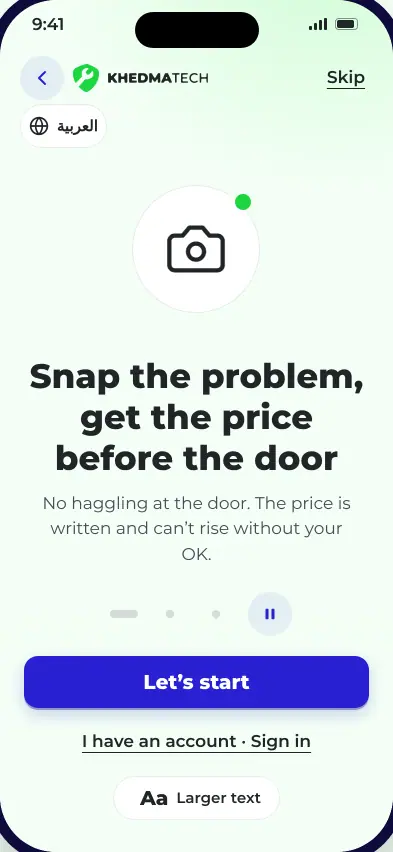
Welcome: snap the problem, get the price before the door 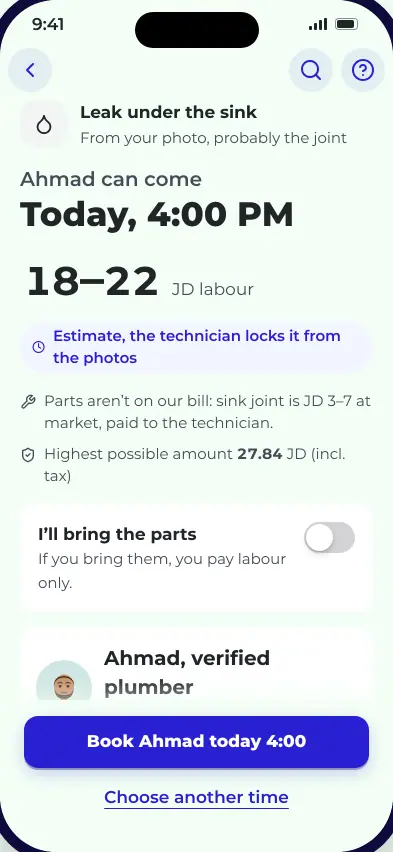
The offer: labour estimate, parts at market price and the highest possible amount 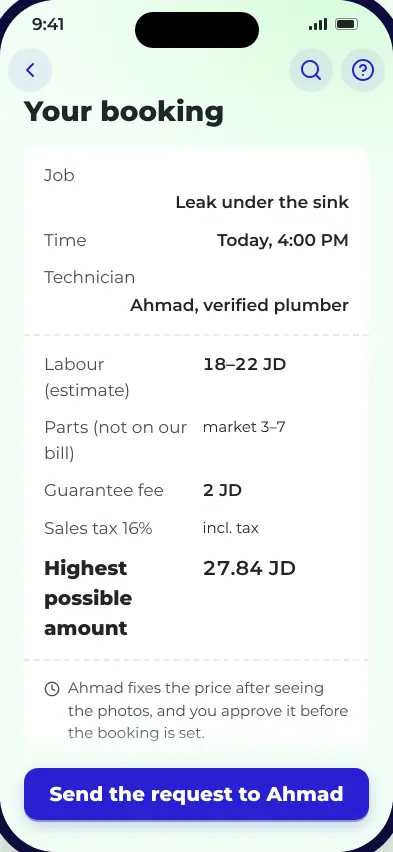
Booking summary: parts are not on our bill 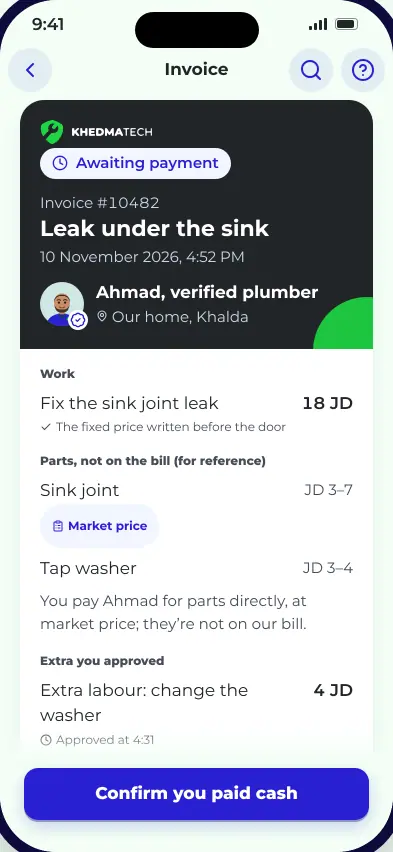
Invoice: the fixed price written before the door, extras the customer approved 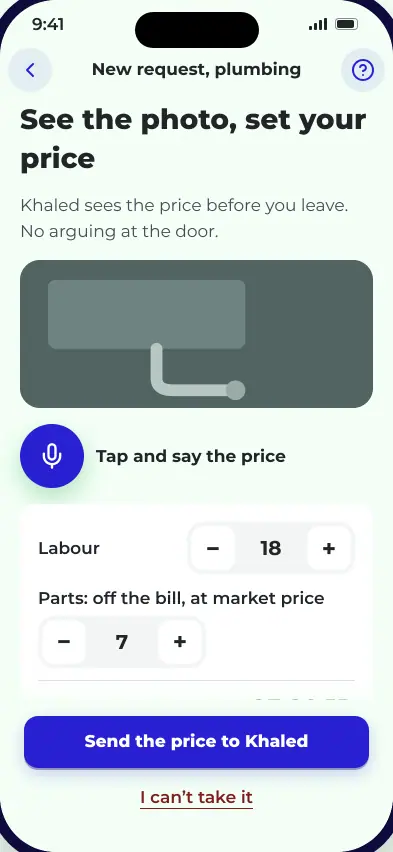
Technician side: see the photo and set the price before leaving 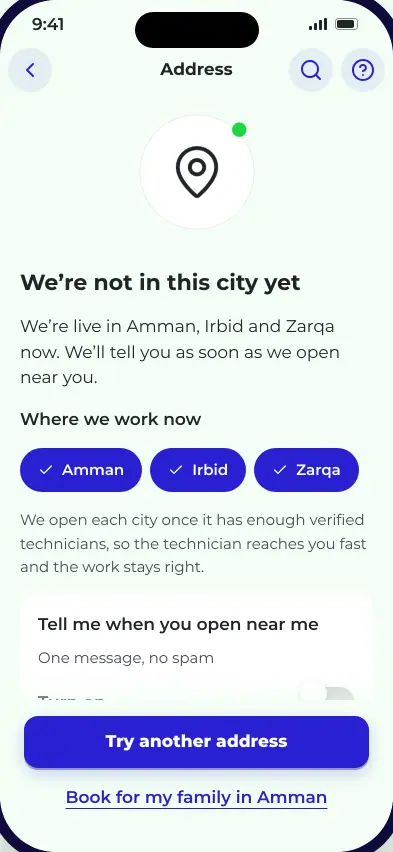
Outside Amman, Irbid and Zarqa: “We’re not in this city yet”
Stage: Prototype
Prototype and design system
The prototype is coded and clickable, with 142 screens in Arabic and 142 in English; Figma holds the mockups. The design system has 4 colour modes, 23 text styles and 54 components, follows the Khedmetak brand, keeps AAA text contrast, and supports large text. The last check passed WCAG 2.2 AA: contrast, 44-point targets and right-to-left Arabic.
Try the prototype live: it is coded and clickable, in Arabic and English, with the large-text and colour modes. Book a repair from the photo to the invoice, or switch to the technician side.

Stage: Testing and accessibility
Accessibility
Arabic first with English, a large-text mode (+25%), and 4 colour modes. Each mode was checked with the Machado 2009 colour-blindness simulation, with AAA text on every tint. Every one of 1,027 buttons was tapped in Arabic, English and large text so no button is dead.
Usability test
8 users tried the prototype with a real booking task and no help. Wherever someone stopped or hesitated, we fixed the screen and tried again.
- P1 found the address page confusing. The fields now start empty, with examples, a map pin and “Use my location”.
- P3 hesitated at the notifications request. The app now shows the messages it will send before asking, with a “Not now” option.
- When the payment failed on purpose, 3 of 3 users retried and paid without help.
- After the fixes, P1 to P3 booked alone the first time.
We also tested 5 versions of the copy with people to see what they understood at first glance, and tapped every one of 1,027 buttons in Arabic, English and large text so no button is dead.
Stage: Reflection
What I’d do differently
I would include technicians in the usability test, not only households, and record task times in numbers so the next decision has a baseline. I would also test the price-locking screen with technicians as early as the booking flow with families, because the adaptive challenge sits on both sides.
Stage: AI-use log
How I used AI
I used AI as an assistant, not as a source. It helped me draft the survey and interview scripts, transcribe our recordings, search for competitors, organise our findings in Figma and check the business model. Every number and quote on this page comes from our own survey, interviews and test, and I reviewed and corrected what the AI produced before the team used it.